

Organizations Rethink Jira Cloud Backup as Recovery Requirements Move Beyond Native Exports
Jira Cloud Backup as Recovery Requirements Move Beyond Native Exports
Organizations are adopting Jira backup solutions with automated recovery, configuration protection, historical visibility, and disaster recovery.
SUNNYVALE, CA, UNITED STATES, August 20, 2026 /EINPresswire.com/ -- Organizations are increasingly evaluating Jira backup based on more than whether a backup copy exists. Automated backups, point-in-time recovery, configuration protection, granular restoration, attachment protection, and recovery testing are becoming important parts of a modern Jira Cloud backup strategy.As Jira Cloud becomes central to software development, IT service management, and enterprise workflows, accidental deletions, incorrect bulk updates, failed integrations, and configuration changes can affect critical project data. This has increased interest in Jira software backup, Atlassian Jira Cloud backup, and third-party recovery solutions that provide more flexibility than traditional site exports.
Why Jira Cloud Backup Requires More Than a Native Export
Atlassian provides native backup capabilities through Jira Cloud's Backup Manager. Administrators can create site-level exports containing Jira data and, where applicable, attachments.
For many organizations, however, recovery requirements extend beyond creating a full export.
A native export is primarily designed around site-level backup and restoration. Recovering a single deleted issue, project, or configuration state can require a more involved restoration process. Organizations also need to consider attachments, workflows, permissions, automation, marketplace applications, retention, and historical recovery points when defining their backup strategy.
This is driving organizations to supplement native Atlassian cloud backup capabilities with dedicated Jira backup software.
What Should a Jira Backup Protect?
A comprehensive Jira backup strategy can include:
- Jira issues and project data, including custom fields, comments, links, epics, stories, and sprint information.
- Attachments and files, including screenshots, documents, and other project assets.
- Configuration, including workflows, boards, permission schemes, screens, and automation rules.
- Historical recovery points that allow administrators to recover data from before an incident occurred.
- Audit and recovery history to understand what changed and when.
- Retention controls aligned with operational and compliance requirements.
The objective is not simply to store another copy of Jira data. It is to ensure that the organization can recover the information and configuration it needs when an incident occurs.
Can You Automate Jira Cloud Backups Using Third-Party Tools?
Yes. Third-party Jira backup solutions can automate scheduled backups through Jira Cloud APIs and maintain copies outside the production Jira environment.
Depending on the solution, automated Jira backup can include issue data, attachments, configuration, historical snapshots, and granular recovery capabilities. Frequent automated backups can also reduce reliance on manual exports and provide more recovery points when an issue is discovered days or weeks after it occurred.
For organizations asking how to export data from Jira, native exports remain useful for migration and administrative purposes. Dedicated backup platforms can extend this approach by maintaining historical copies and supporting recovery rather than simply generating a one-time export.
Recovering Deleted Jira Issues
Deleted issues can create significant operational and reporting problems. Before attempting recovery, administrators should confirm the issue was actually deleted and determine when the deletion occurred.
If the issue is no longer available through Jira's native recovery options, a backup containing the issue from before deletion may provide another recovery path.
Point-in-time recovery allows administrators to identify the state of Jira before the incident. Granular recovery can then reduce the need to roll back unrelated project data.
For larger deletion events or incorrect bulk updates, mass recovery capabilities can be more practical than restoring individual issues one at a time. Testing recovery in a non-production environment can also help administrators validate the result before making changes to production.
Jira Backup and Disaster Recovery
Jira backup and Jira disaster recovery serve related but different purposes.
Backup creates independent copies of Jira data and configuration for recovery. Disaster recovery encompasses the broader processes, recovery objectives, testing, dependencies, and procedures required to restore Jira operations after a major disruption.
For organizations that depend heavily on Jira, backup should therefore be treated as part of a broader business continuity and enterprise disaster recovery strategy. This is particularly relevant for organizations where Jira supports critical software development, IT service management, compliance, or operational workflows.
How Vast Edge Approaches Jira Backup and Recovery
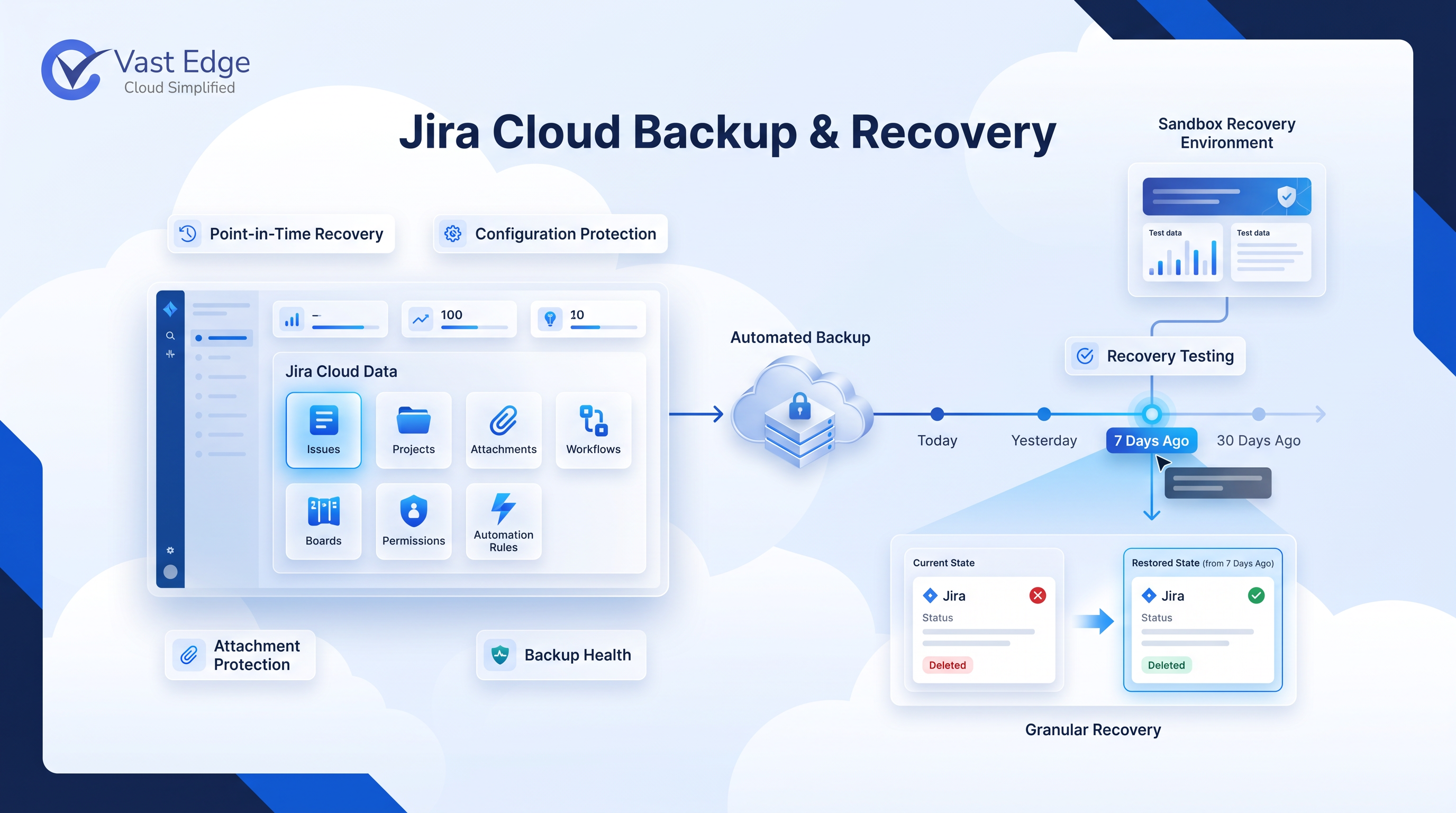
Vast Edge's Jira backup platform combines automated protection, historical visibility, granular recovery, and recovery validation as part of its broader backup and disaster recovery solutions for enterprise environments.
Its Jira Time Machine allows administrators to view Jira data from historical points in time and compare previous states before initiating recovery. Point-in-time and granular recovery capabilities support restoration of specific issues, issue sets, and projects without requiring a full site rollback.
The platform also protects attachments and Jira configuration, including workflows, boards, permissions, and automation rules. Sandbox recovery testing allows teams to validate recovery procedures before applying changes to production.
For larger incidents, mass rollback capabilities can support recovery from bulk deletions, incorrect updates, failed integrations, and widespread data corruption. Backup health monitoring and audit history provide additional visibility into backup status and recovery activity.
Executive Quote
“Organizations are realizing that having a Jira backup is only the starting point. They also need to know what is protected, how far back they can recover, and whether they can restore specific data without disrupting everything else,” said Vik Mehta, CEO of Vast Edge. “The focus is shifting from simply creating backups to proving that those backups can support recovery when an incident occurs.”
Frequently Asked Questions
What is Jira backup?
Jira backup is the process of creating independent, recoverable copies of Jira Cloud data, attachments, and configuration for use following data loss or corruption.
What is Atlassian Jira Cloud backup?
Atlassian Jira Cloud backup refers to the native backup and export capabilities available through Jira Cloud administration. Organizations may supplement these capabilities with third-party Jira backup software for automated scheduling, historical recovery, and granular restoration.
Can I automate Jira Cloud backups using third-party tools?
Yes. Third-party Jira backup platforms can automate scheduled backups through Jira Cloud APIs and maintain independent backup copies outside the production environment.
How do I export data from Jira?
Jira provides several export options, including the native Backup Manager for site-level exports and CSV exports for selected issue data. Third-party backup platforms can provide broader historical backup and recovery capabilities.
What should a Jira backup include?
A comprehensive backup should consider issues, projects, custom fields, comments, attachments, workflows, boards, permissions, automation, and other configuration required to operate the Jira environment.
What is the difference between Jira backup and disaster recovery?
Jira backup provides recoverable copies of data and configuration. Disaster recovery includes the wider recovery procedures, testing, objectives, dependencies, and business continuity planning required to restore operations.
About Vast Edge
Founded in 2004 by former KPMG technology professionals, Vast Edge provides enterprise cloud solutions, backup and disaster recovery services, managed cloud infrastructure, AI-powered business applications, analytics, and enterprise security. Its backup portfolio includes solutions for Salesforce, NetSuite, Workday, Jira Cloud, Microsoft 365, and Google Workspace, along with cloud migration, ERP integration, and analytics services. Vast Edge supports enterprise environments across Microsoft Azure, Amazon Web Services, Google Cloud Platform, and Oracle Cloud Infrastructure.
Vik Mehta
Vast Edge
+1 408-386-6386
vik@vastedge.com
Visit us on social media:
LinkedIn
Facebook
YouTube
X
Legal Disclaimer:
EIN Presswire provides this news content "as is" without warranty of any kind. We do not accept any responsibility or liability for the accuracy, content, images, videos, licenses, completeness, legality, or reliability of the information contained in this article. If you have any complaints or copyright issues related to this article, kindly contact the author above.
